ADR Dub Studio icon
Dubbing and ADR · macOS and Windows

A DAW built for dubbing

ADR Dub Studio brings together in one program everything the dubbing room needs: script and cues, take recording with beeps and countdown, actor headphones, video sync, mixing and delivery with stems and a report.

Video in sync
ADR recording
Delivery with stems
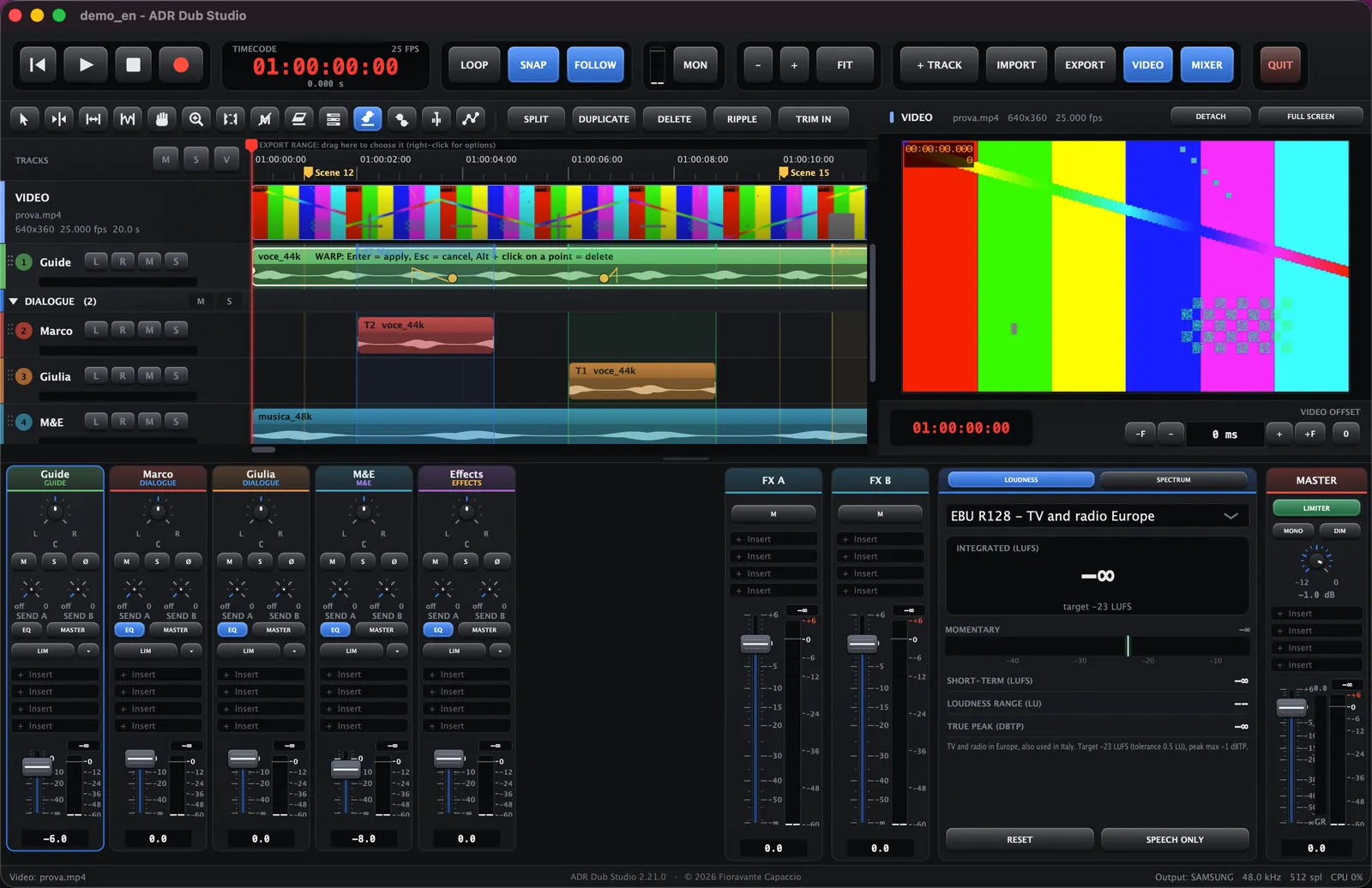
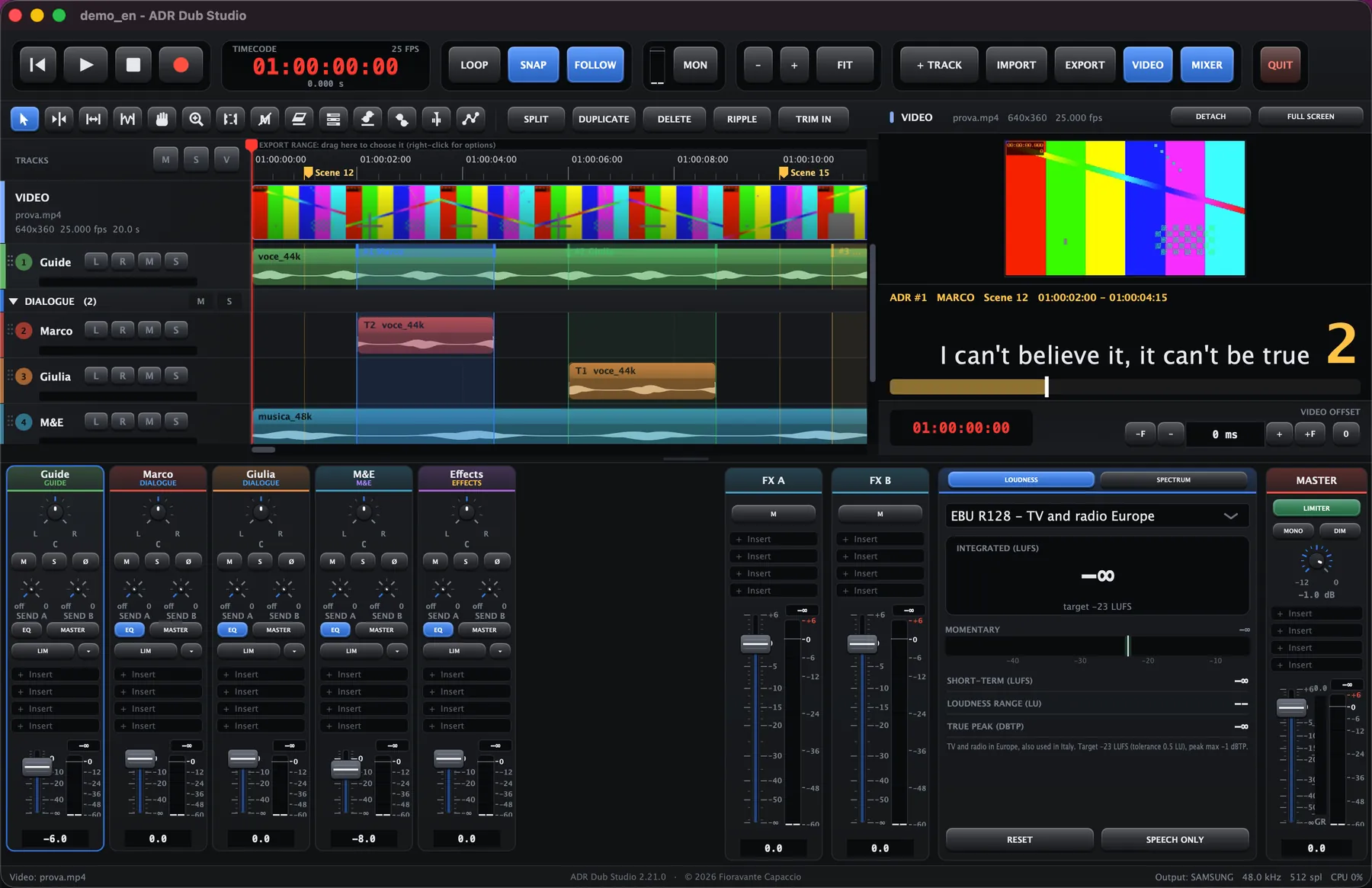
ADR Dub Studio main window with timeline, video and mixer
ADR DUB STUDIO SESSION — TIMELINE, VIDEO AND MIXERLIVE
ADR CUESTAKESTIME WARPSTEMSMTCVST3EDLBWFADR CUESTAKESTIME WARPSTEMSMTCVST3EDLBWF
30

days of free trial with every feature, no sign-up

€49

one-time license, optional: the program keeps working after the trial

2

systems: macOS (Apple Silicon and Intel) and Windows 10/11

Main features

A single program for studio work: from importing cues to delivering the mix, without jumping between applications.

Video and sync

Import the video and work with the session timecode: the viewer can be detached to another screen, shown full-screen, and can even burn the cue number, character, scene and line into the picture. Automatic scene-cut detection. macOS uses AVFoundation, Windows uses ffmpeg (included in the installer).

Cues and script

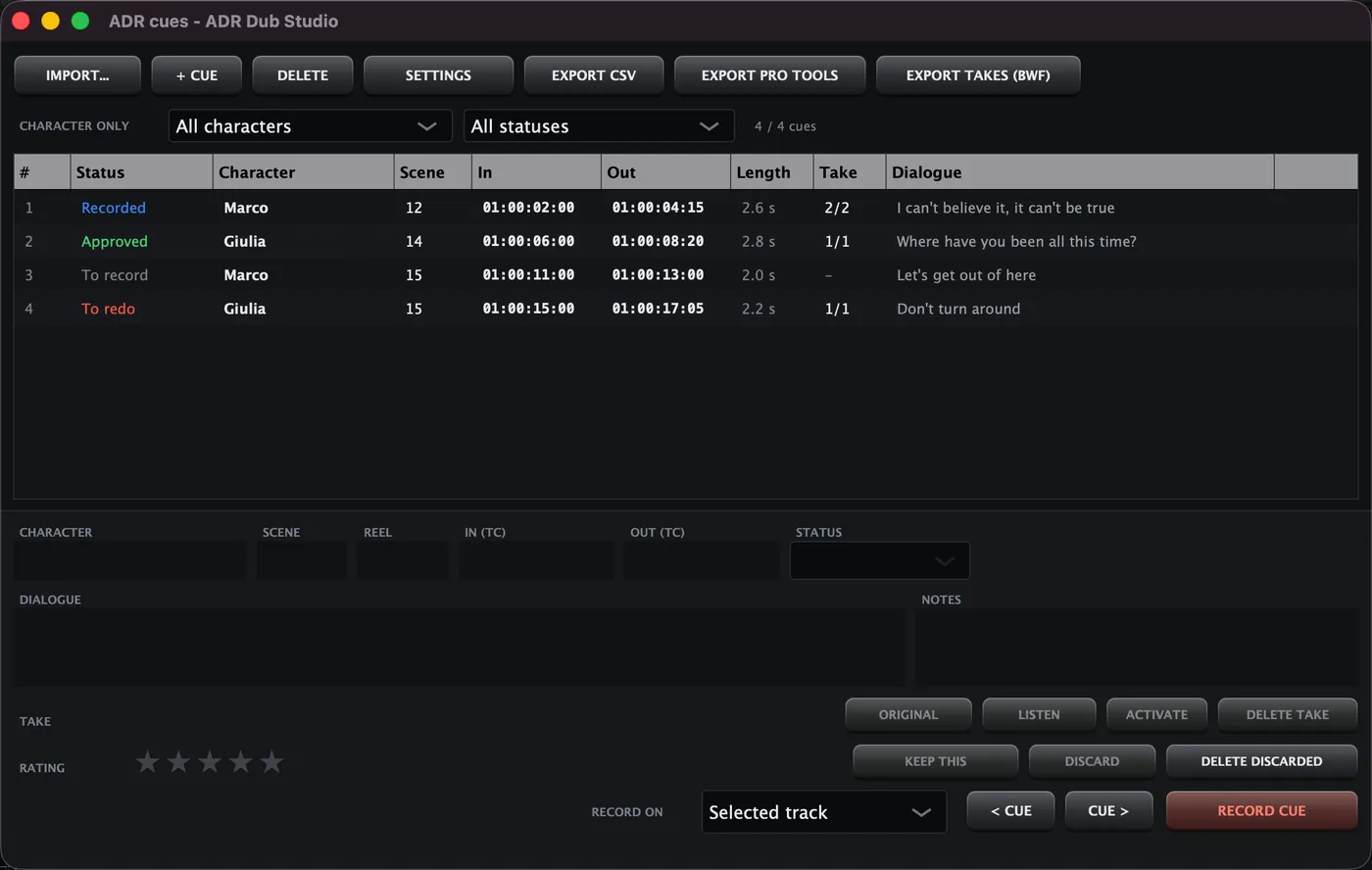
Import cues from Pro Tools, EDL (Nuendo too), CSV/TSV (Nuendo, Fairlight, Resolve, ADR reports) and SRT/WebVTT subtitles: just drag the file in. The ADR panel filters by character and status (to record, recorded, approved, to redo), and one track per character is created automatically.

Take recording

Beeps at the in-point, countdown and a red bar over the picture for the length of the cue. Several recordings of the same cue, with star ratings, non-destructive rejection, "Keep this" and take lanes. Punch in/out recording with latency compensation. Import of takes already recorded (files like Cue012_Marco_Take2.wav).

Actor headphones and booth

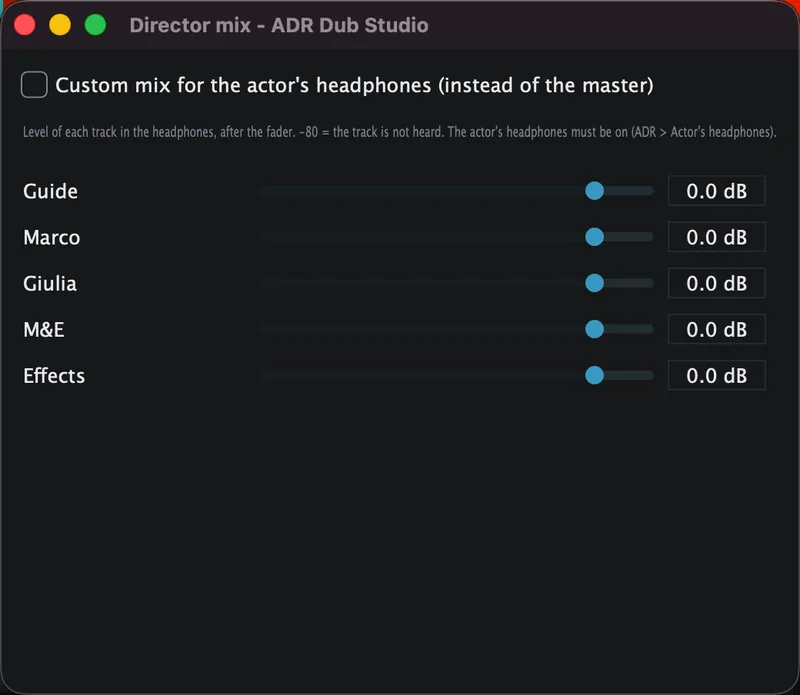
Separate headphones on the second output pair, with a dedicated mix adjustable per track (director mix), beeps, director talkback and a script reader for the actor with an adjustable font size.

Time Warp and alignment

Move words inside a take with anchor points, without changing the pitch. A sync point inside the clip that snaps to the cue. Automatic alignment to the guide, also phrase by phrase. Clip time-stretch.

Full mixer

Channels with parametric EQ, limiter, A/B sends, buses by role (Dialogue, Guide, M&E, Effects) and a master with limiter. VST3 plug-ins as inserts, built-in effects (saturation, chorus, multiband compressor), automatic plug-in delay compensation, Track Delay, mixer snapshots, track presets and an automatic volume leveler (an automation that evens out the perceived level).

Precise editing

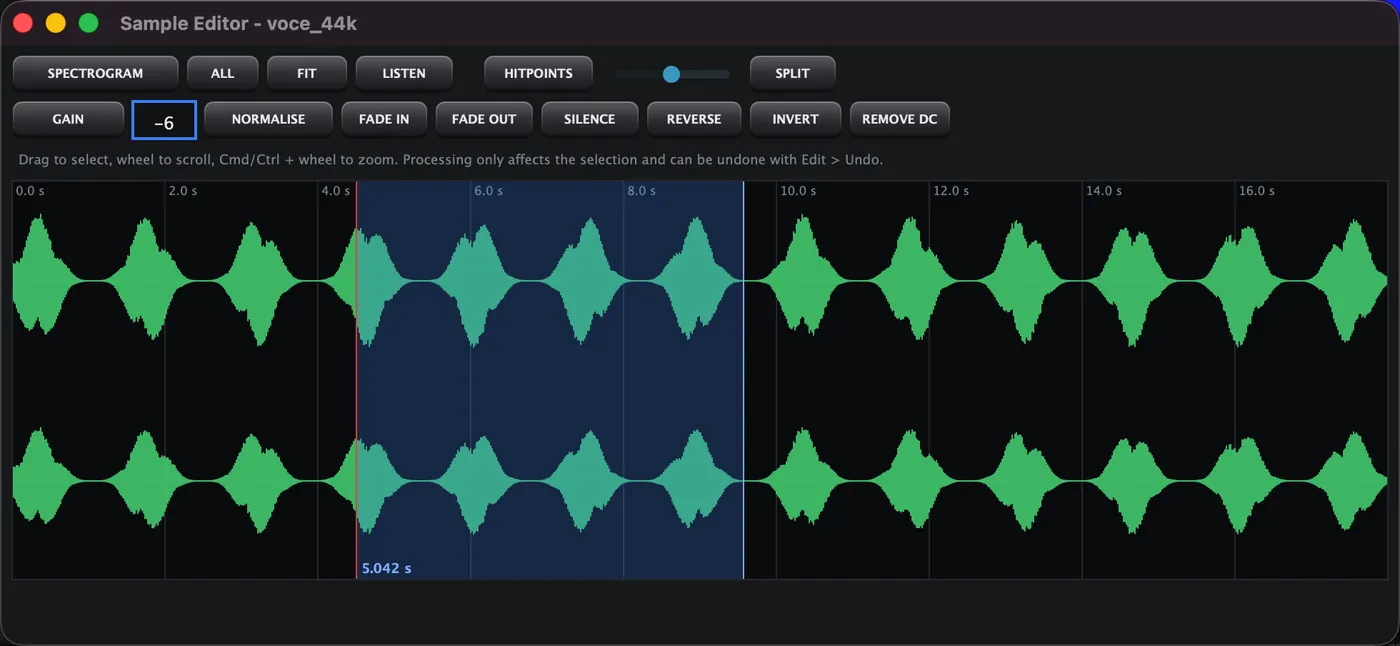
Select, Razor, Slip, Hand, Zoom, Range, Mute, Eraser, Comp, Warp, Scrub and Envelope tools. Normal, Ripple and Shuffle modes. Sample Editor with waveform and spectrogram, hitpoints and slicing, Insert Silence / Remove Time, crossfades and automatic fades, Snap to Zero Crossing, Info Line.

Loudness and delivery

Loudness measurement (also on speech only) with TV and streaming presets. Export the MIX and the Dialogue, M&E and Effects stems with a delivery report, leaving the Guide out. Export also to MP3 (320 kbps) for listening and review, batch export, session packages (Clip Package), track archives, review video with burn-in, printable cue sheet and script per character, EBU R128.

Reliable sessions

Autosave and recovery after an abnormal exit. If a file is missing the clip stays as OFFLINE and can be relinked from a folder. Numbered versions with a note, Session Check and a workflow guide that shows where you are. 100-step undo.

New cut

ReConform: when a new cut of the video arrives, it carries audio, cues and markers over to the new positions from the old and new EDLs, with a preview of the result and a single undo step.

External sync

Chase to MTC timecode (MIDI input) to start and stop the program together with other systems. 24, 25, 29.97 and 30 fps timecode, following the video frame rate.

Made for working

Media Pool, Logical Editor, batch rename, reference track with A/B comparison, zoom presets and track visibility configurations. Dark, Light, High contrast and Default 5 themes, three layouts, customisable keyboard shortcuts. The interface is in Italian and English and a complete manual of about 80 pages is available in both languages.

Dialogue, music and effects

Separate the audio of a film into Dialogue, Music and Effects with an artificial-intelligence model that runs on your computer (trained on cinema audio). Get the international M&E track from a finished film, with the tracks already in the right role and in a single undo step. Dialogue + Music + Effects = original. After separation, the clean dialogue can be split into two tracks, male voice and female voice, recognised by pitch. The model is downloaded the first time (about 110 MB), then everything is offline.

All local

No account, no audio in the cloud, no subscription. The program works offline and can be tried for 30 days with every feature; the license is optional and the program keeps working even after the trial.

Interface preview

The main window, the cue panel, the waveform editor, Time Warp, the director mix and export.

ADR Dub Studio main window with timeline, video and mixer
The main window: timeline, video, cues on the ruler and mixer
ADR cue panel
ADR cue panel: status, takes, rating and recording
Time Warp tool on the timeline
Time Warp: move words inside the take without changing the pitch
Sample Editor
Sample Editor: zoomable waveform and spectrogram
Director mix for the headphones
Director mix: the level of each track in the actor's headphones
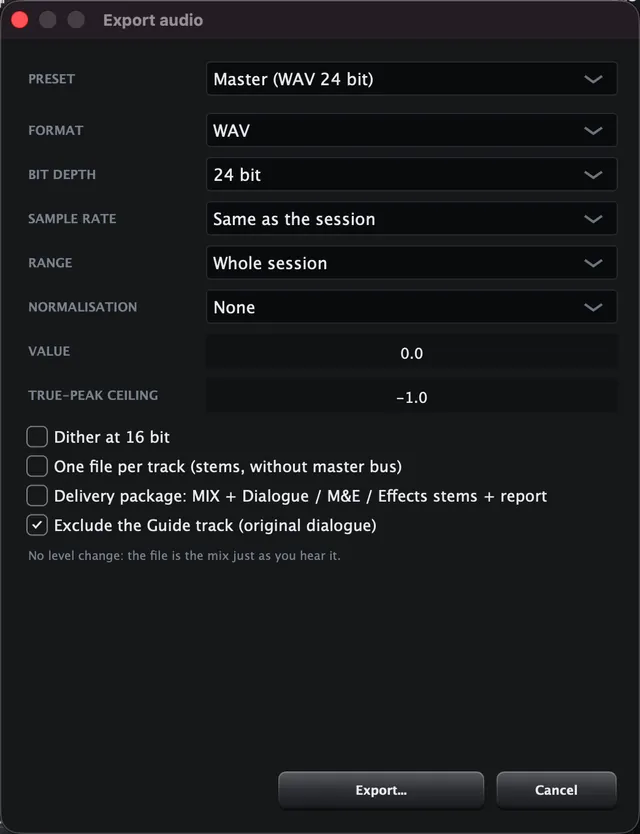
Export window
Export: MIX and stems with loudness presets

The workflow

The steps of a dubbing session, in the order you do them. The program's "Workflow guide" (Help menu) shows where you are and launches the right command.

1. Import

The video and the list of lines (Pro Tools, EDL, CSV, SRT): each character gets a track.

2. Record

Select the cue and press Record: beeps, countdown and a red bar guide the actor. Every repetition is a take.

3. Choose

Listen to the takes, give them stars, keep the best one and discard the rest without deleting anything.

4. Sync

Align to the guide, move words with Time Warp, snap the sync point to the cue.

5. Mix

Balance Dialogue, M&E and Effects, measure the loudness and check against the reference track.

6. Deliver

Export the MIX and stems with the delivery report, the review video and the cue sheets.

The complete manual (about 80 pages, with screenshots) opens from the program: Help > User manual.

System requirements

The program runs entirely locally: no account, no audio in the cloud, no engine to download. The app is only a few tens of MB.

macOS

  • macOS 11 Big Sur or later
  • Universal: Apple Silicon and Intel Macs
  • An audio interface (the Mac's built-in one works); for the actor headphones you need at least 4 outputs
  • Video through AVFoundation: nothing to install

Windows

  • Windows 10 or 11, 64-bit
  • Installer (Setup.exe) or portable version (zip)
  • Video through ffmpeg, already included in the installer
  • The manual opens inside the program (using Windows WebView2; in the browser if it is missing)

Plug-ins: VST3 format. Delivery formats: WAV, AIFF and FLAC; review video as .mov.

Download ADR Dub Studio

For macOS and Windows, with a 30-day trial with every feature. No sign-up.

On macOS, the first time open the program with right-click > Open (the signature is provisional). On Windows, if the SmartScreen warning appears, choose "More info" and then "Run anyway".

Price and trial

Try the program for 30 days with every feature. Then, if it is useful to you, buy the license: one price, paid once. Payment is optional: the program keeps working even after the trial ends.

Single license
ADR Dub Studio
49.00 €
All features, for macOS and Windows.
  • Payment is optional: after the trial the program keeps working with every feature
  • No subscription: you pay once
  • 30-day trial with every feature, no sign-up
  • License tied to the computer (Machine ID), checked offline
  • Without a license only a 5-second reminder screen appears at startup
  • Manual in Italian and English included in the program
Buy the license — €49

Secure payment with Lemon Squeezy. For help write to support@adr-suite.com.

FAQ

Do I have to pay to use the program?

No: payment is optional. After the 30-day trial the program keeps working with every feature; only a 5-second reminder screen appears at startup. If it is useful to you, you can buy the license (€49, once) and the screen goes away.

What is the difference from ADR Studio Suite?

ADR Studio Suite is an application for preparing the work: automatic transcription and translation, cue management and export to other DAWs. ADR Dub Studio is a complete DAW in which you record, edit and deliver: the two programs are separate products with separate licenses and complement each other.

Do I need an internet connection?

No. After installation it works entirely offline: the license is checked on the computer, with no connection to any server.

How does the license work?

From Help > License you copy your computer's Machine ID and send it to support@adr-suite.com: you receive a .lic file that you import in the same window. The license is valid on that computer and is checked offline.

What happens after the 30-day trial?

The program keeps working with every feature. At startup a screen appears with your Machine ID and a "Continue" button that becomes active after 5 seconds, until you activate the license.

Does it run on Intel Macs and Apple Silicon?

Yes: the macOS version is universal, for macOS 11 or later. On Windows you need Windows 10 or 11, 64-bit.

Can I use my own plug-ins?

Yes, VST3 plug-ins load as inserts on channels, on the master and on the FX returns.

Can I work with files from other DAWs?

You import and export audio files (WAV, AIFF, FLAC) and import cues from Pro Tools, EDL, CSV and subtitles. AAF/OMF/MXF, surround/Atmos and LTC are not supported; external sync receives MTC.

Which languages is the program in?

Italian and English, selectable from Help > Language; the manual is available in both languages.